
WhatsApp’s Advanced Chat Privacy! Here’s How to Turn It On and Off
Meta-owned WhatsApp is highly popular for its privacy and security features. Did you know that WhatsApp has a hidden feature called “Advanced Chat Privacy” to make your chats even more secure? Yes! Let’s find out what this is and how to enable and disable it.
What is Advanced Chat Privacy in WhatsApp?
The Advanced Chat Privacy feature in WhatsApp is designed to secure sensitive information shared within the app. This setting is hidden within individual chats on WhatsApp and must be activated manually.
This feature allows you to set limits on sharing messages and media sent from specific chats outside of WhatsApp. This feature is available for both Android and iPhone users. As soon as you enable this on a WhatsApp chat, the 3 actions listed below will automatically start executing.
- Can’t save media to their device gallery automatically.
- Can’t ask Meta AI questions, or to create images or summaries in this chat.
- Can’t export the chat.
Turn On Advanced Chat Privacy in WhatsApp
This security feature is disabled by default in WhatsApp chats, and you have to enable it for each chat individually. The steps mentioned below will help you enable this. Before proceeding, ensure that your WhatsApp is updated to the latest version.
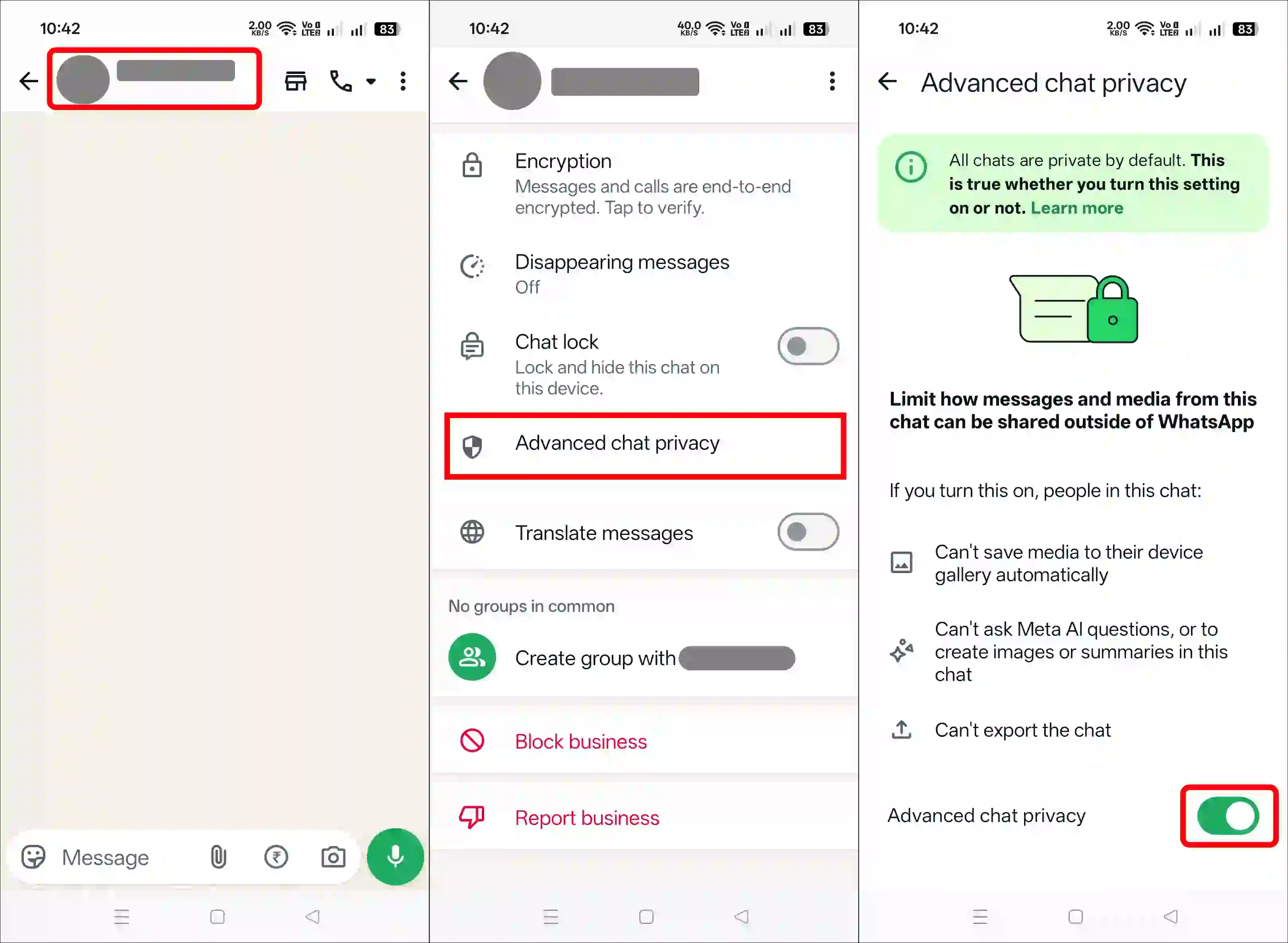
To enable advanced chat privacy in WhatsApp:
- Open WhatsApp on Your Phone.
- Now, Navigate to Individual or Group Chat You Want to Secure.
- Tap on Contact’s Name or Group Name at the Top.
- Scroll Down and Tap on Advanced Chat Privacy.
- Simply, Enable the “Advanced Chat Privacy” Toggle.
Also read: How to Enable Reshare on WhatsApp Status
Turn Off Advanced Chat Privacy in WhatsApp
You may have previously enabled Advanced Chat Privacy in a WhatsApp chat, but now you wish to disable it. As soon as you disable this, that specific chat will start behaving exactly as it did before. Simply follow the steps provided below, one by one.
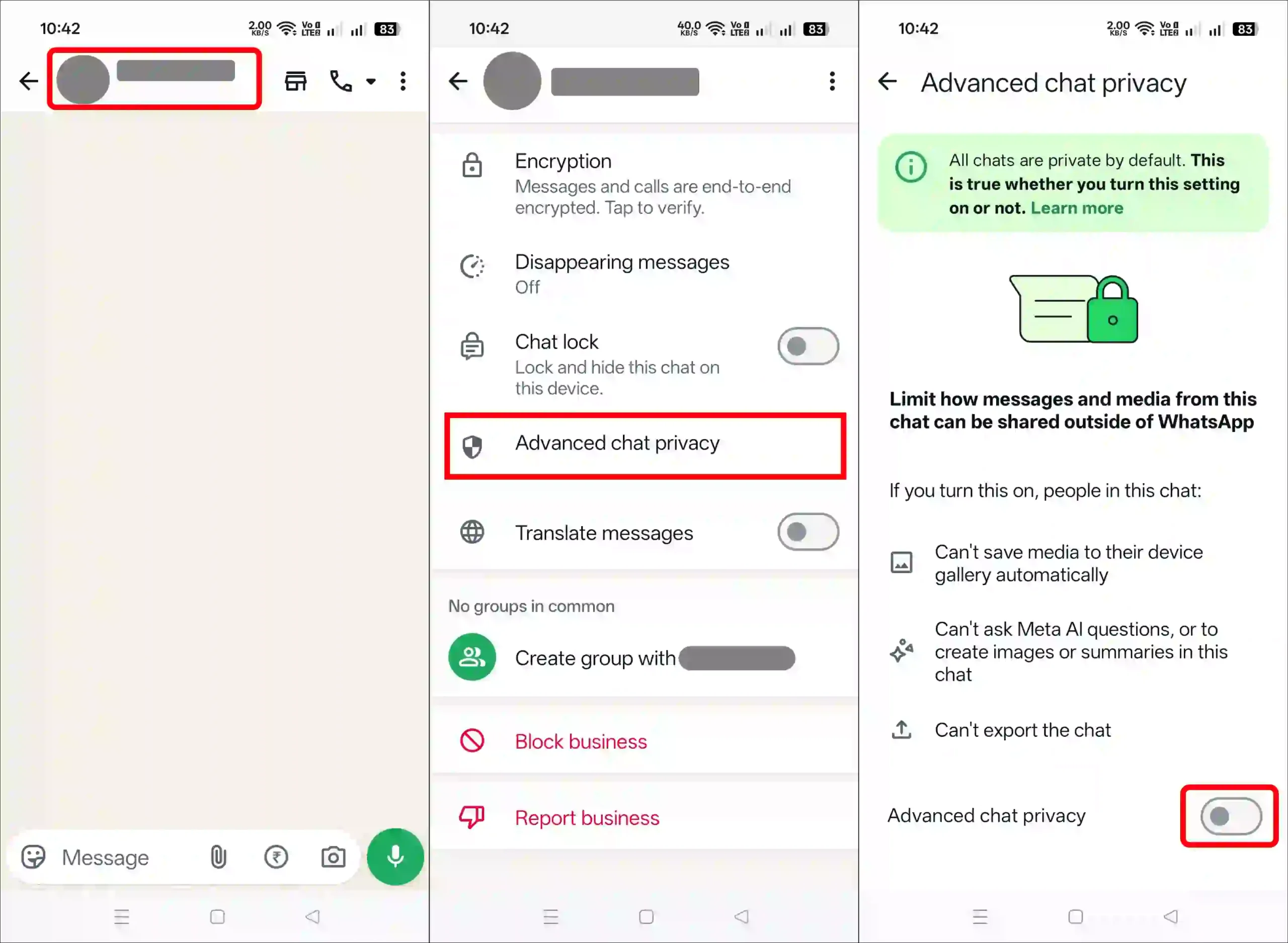
To disable advanced chat privacy in WhatsApp:
- Open WhatsApp on Your Phone.
- Now, Navigate to Individual or Group Chat.
- Tap on Contact’s Name or Group Name at the Top.
- Scroll Down and Tap on Advanced Chat Privacy.
- Simply, Disable the “Advanced Chat Privacy” Toggle.
Also read: How to Turn Off Live (Motion) Photos on WhatsApp
Enable or Disable Advanced Chat Privacy in WhatsApp for All Chats at Once
If you want to enable or disable this Advanced Chat Privacy feature for all chats at once in WhatsApp, that is not possible. Currently, you have to enable or disable it one by one for individual or group chats. As of now, there is no update from WhatsApp allowing you to manage this feature for multiple chats all at once.
FAQs
Q 1. If I turn on advanced chat privacy on WhatsApp, will they know?
Answer – Yes! If you enable Advanced Chat Privacy in an individual chat or a group, everyone involved in that group or private conversation will be notified that you have turned on this feature in the chat.
Q 2. Why would someone turn on advanced chat privacy on WhatsApp?
Answer – A user enables advanced chat privacy on WhatsApp to prevent their messages and media from being shared or saved outside a specific chat.





Hello