How to Replace Photo on Instagram Carousel after Posting Without Deleting in 2026
Instagram is very popular for posting photos as well as Reels. Instagram has a Carousel feature that allows you to post multiple photos and videos in a single post. But the problem arises when users realize after posting that the post contains a photo that shouldn’t be there, and they want to replace it without deleting the entire post.
If you’re one of those users who wants to add one or more photos to an Instagram carousel post without completely deleting it, it’s possible, and Instagram allows you to do so.

For this, update your Instagram app to the beta version. The latest beta version includes a feature that allows you to delete a specific photo from a previously posted carousel and replace it with a new one, which is a very useful feature.
How to Replace Photo on Instagram Carousel after Posting Without Deleting in 2026
Previously, Instagram didn’t allow you to add photos to already posted carousel posts, meaning you had to completely delete the post and create a new one. However, this new “Add Photos” feature in the latest Instagram version has made this process much easier.
To add more photos to an already posted Instagram carousel:
- Open Instagram App on Your Android or iPhone.
- Go to Your Profile and Open a Carousel Post.

- Tap on Three ⁝ Dots and then Edit.
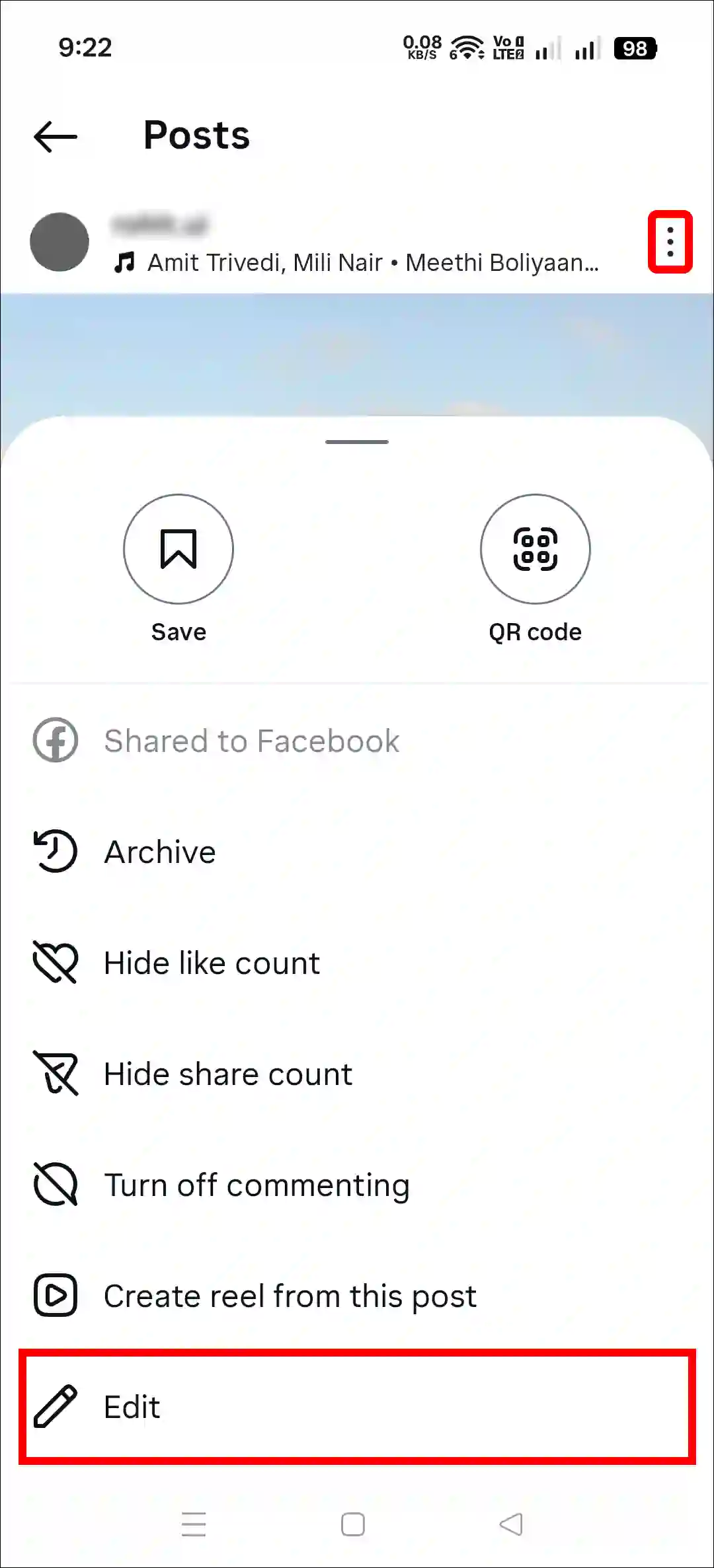
- Delete a Photo If You Want and Tap on Add Photos Option Under Your IG Username.

- Now, Select a Photo from Your Gallery.
- Once All is Done, Simply Tap on the Tick Icon at the Top Right Corner.

That’s it! The new photo has now been added to your previously posted carousel post. In this way, you can edit all your old carousel posts and replace the existing photos with new ones. Similarly, you can also change or remove the music song from an Instagram post after posting it.
Also read: How to Enable or Disable GIF Comments on Instagram Posts and Reels
FAQs
Q 1. Why can’t I change the photo on my Instagram post after posting it?
Answer – If Instagram isn’t letting you change the photo of a post after it’s been posted, there could be several reasons, such as you’re using the outdated Instagram app, you’re not an Instagram beta program member, you haven’t got the feature yet, etc. For this, keep updating your Instagram regularly.
Q 2. Can I edit or replace a picture on an Instagram carousel after I post it?
Answer – Yes! Instagram now allows this. To do this, go to your profile on Instagram and open the carousel post. Then, tap the three dots in the upper right corner and select the Edit option. Now, you can add new photos by tapping “Add Photos” below your username.
Q 3. Can you change the order of carousel photos on instagram after posting?
Answer – No! If you’ve already posted a carousel but now want to rearrange the photos, Instagram doesn’t currently allow you to do this. However, there is a workaround that will let you rearrange the photos in your carousel. This is possible using the delete and add photos options; all the steps are mentioned above.
I hope you found this article helpful and that you’ve learned how to replace a photo on an Instagram carousel after posting without deleting. If you have any problems or questions related to Instagram, please let us know in the comments below. Don’t forget to share this article with your friends on social media.