Instagram’s Chat Theme Song Feature! Here’s How to Use It?
Meta frequently introduces new features on Instagram. This time, a chat theme song feature has been introduced. Let’s find out what this feature is and how to set it up in an Instagram DM conversation. We’ll also learn how to fix it if this feature is not showing up or not working in Instagram.
What is Instagram’s New Chat Theme Song Feature?
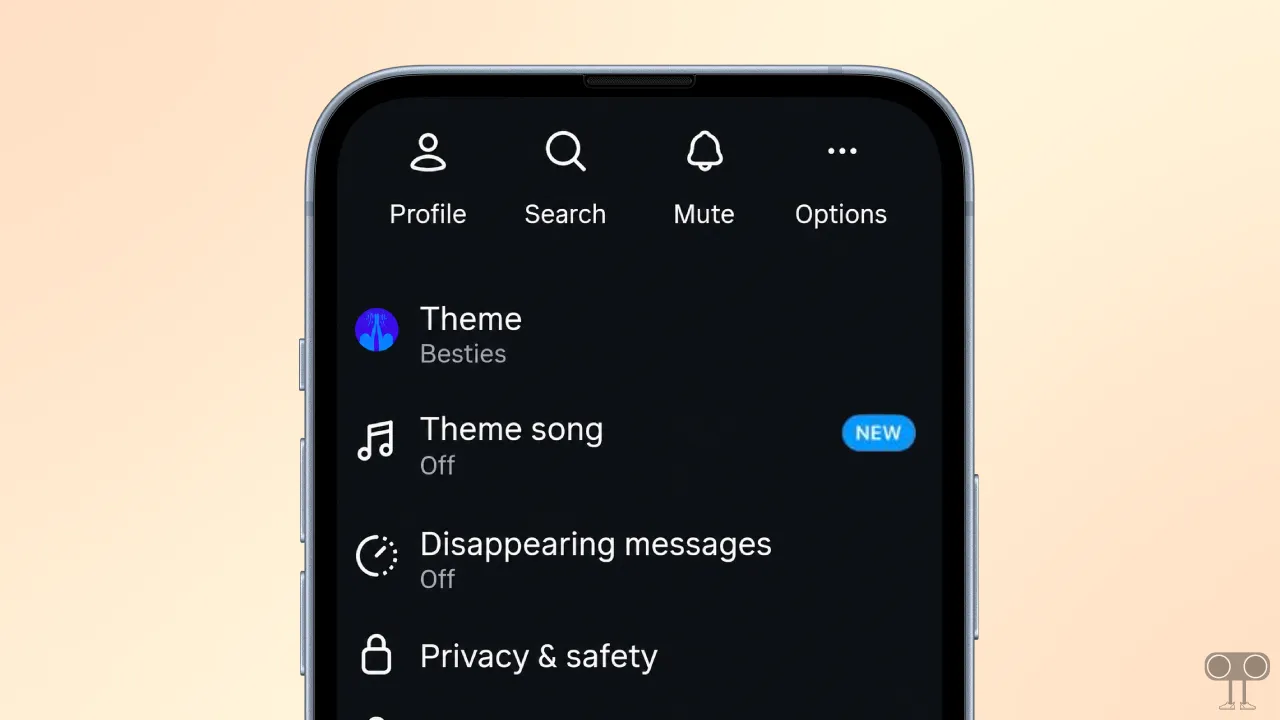
Instagram’s new chat theme song feature allows you to add a specific background song or audio track directly to a direct message (DM) conversation with an individual or a group. When you activate it, it personalizes the chat interface with the selected music.
Setting up this new theme song feature in Instagram chat is extremely easy. Simply open any chat in your DMs, navigate to chat settings, and tap on the Theme Song option. You can then choose your preferred audio track. For more details, follow the steps below.
How to Use Instagram’s New Chat Theme Song Feature?
Since this is a new feature, you might not see this option in your Instagram app yet. Before following the steps below, make sure your Instagram app is updated to the latest version.
To set song in Instagram chat:
- Open Instagram App and Go to DM Section.
- Open Any Individual or Group Chat.
- Tap on Chat Name or User Profile at the Top. (This will Open Chat Settings.)
- Tap on Theme Song Option.
- Select Your Favourite Song.
- Now, You’re Done.
That’s all! As soon as you complete all the steps above, the music song will be set in your chat, and a popup message saying ‘Theme Song Set’ will appear.
Fix Chat Theme Song Option Note Showing in Instagram DM
This is a new feature, so you may not have received it yet. You might also be using an outdated version of Instagram, or the Instagram cache may be corrupted. You can fix this issue by following the steps mentioned below.
1. Update Your Instagram App
Chat Theme Song is a completely new feature. If you are using the outdated Instagram app, you may not see it. Whether you are an Android user or an iPhone user, the Chat Theme Song option will start appearing in your IG DM once you update Instagram.
You can easily update the app from the Google Play Store (for Android) and the Apple App Store (for iOS).
2. Clear Instagram App Cache (Android)
If you have updated Instagram but the Chat Theme Song option is still missing, then one of the reasons could be a corrupted cache. However, by clearing the corrupted cache, you can fix this problem and bring back the Chat Theme Song feature.
- Press and Hold Instagram Icon and Tap on App Info.
- Tap on Storage Usage.
- Tap on Clear Cache.
3. Offload IG App (iPhone)
If you’re using an iPhone, unfortunately there is no dedicated option to clear the cache. However, on an iPhone, you can delete the outdated data of the Instagram app by offloading it.
For this, go to iPhone’s Settings > iPhone Storage > Instagram App > Offload App > Offload App to Confirm > Reinstall App.
4. Wait for Your Turn
If the Chat Theme Song option is not appearing even after updating Instagram and clearing the corrupted cache, you will have to wait for some time. This is because it is a new feature, and it is being rolled out gradually to all users.
Also, regularly check the Play Store or Apple App Store for Instagram updates. If there is an update available, install it immediately.
I hope you found this article helpful and learned how to use theme song in Instagram chats. If you have any other questions about Instagram, feel free to ask in the comments below. Don’t forget to share this article.