VLC Media Player Opening Slow on Windows 11 PC or Laptop
I have been noticing for quite some time that whenever I launch VLC Media Player on my Windows 11 computer or laptop, it opens very slowly. Later, I found out that this issue wasn’t just with me but with almost all Windows 11 users. However, I have found a solution to this problem and have mentioned all the methods below.
Why is VLC Media Player slow to open on Windows 11?

The main reason for VLC Media Player opening slowly on Windows 11 is a conflict between Microsoft Defender and the VLC player’s plugin cache. Whenever you launch the VLC player, Microsoft Defender mistakenly quarantines or scans the cache files.
However, Microsoft allows us to exclude the program folder from Windows Security, and this action helps VLC Player load much faster. Simply follow the methods mentioned below one by one, and your issue will be resolved.
Fix If Your VLC Media Player Takes a Long Time to Start
Method 1: Add a Windows Security Exclusion
Step 1. Press Windows + S and Search “Windows Security” and Open It.
Step 2. Go to Virus & Threat Protection and Click Manage Settings Under Protection Settings.
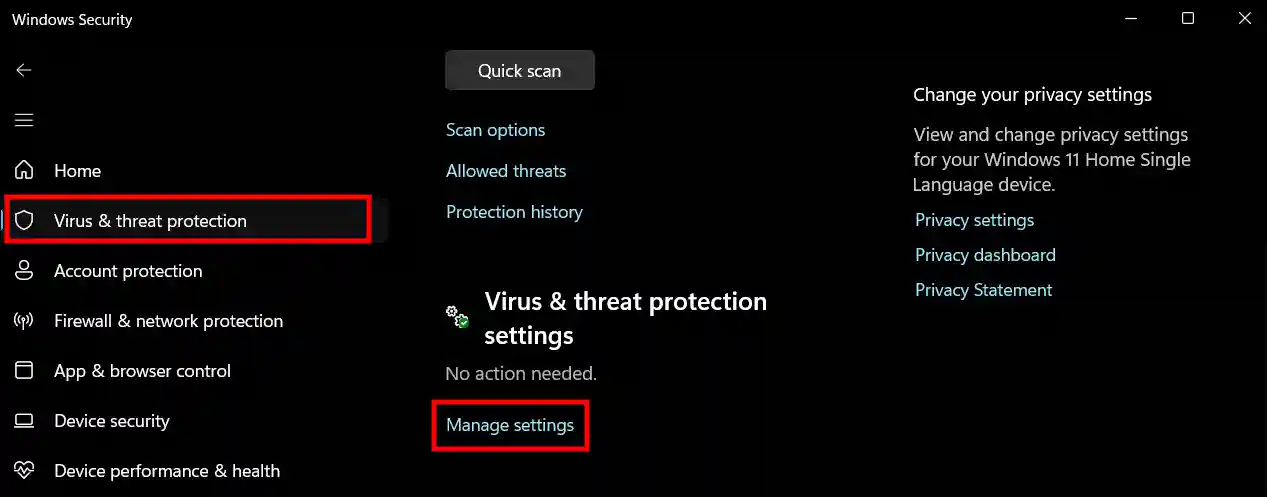
Step 3. Scroll Down to Exclusions and Click on Add or Remove Exclusions.
Step 4. Click YES on User Account Control (UAC) Prompt.
Step 5. Click on + Add an Exclusion.
Step 6. Now, Add Your VLC Installation Folder (usually C:\Program Files\VideoLAN\VLC).
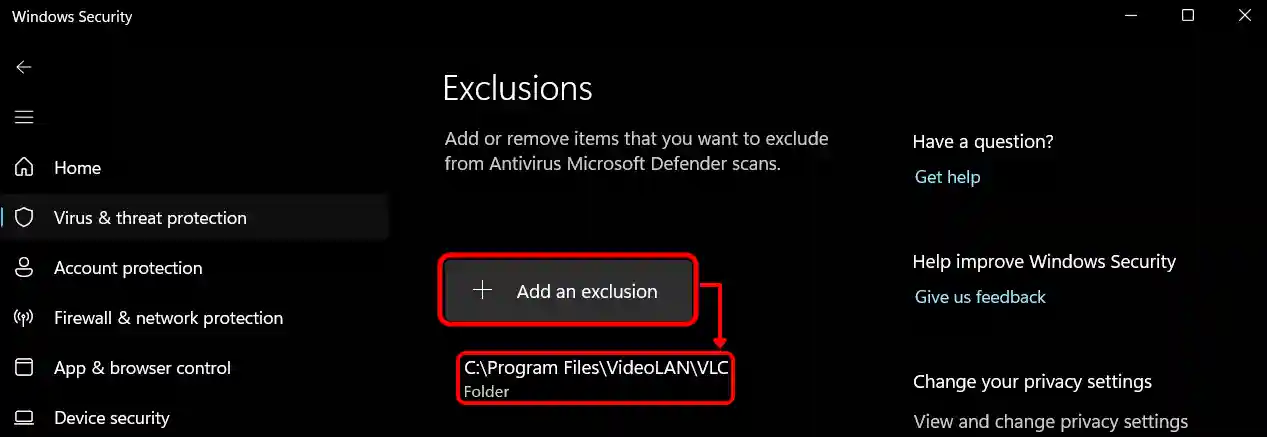
You’re all set! Usually, following Method 1 resolves the slow opening issue, but if the problem persists, be sure to try Method 2 mentioned below.
Method 2: Regenerate Plugin Cache
- Open Your VLC Installation Folder (Usually
C:\Program Files\VideoLAN\VLC). - Now, Type
CMDin the Top Folder Address Bar and Hit Enter. - Type
vlc-cache-gen.exe .\pluginsin the Command Window and Press Enter.
That’s it! You’re all set. Now, whenever you open the VLC Media Player, it will launch instantly instead of taking a long time like before.
You may also like:
- Delete Recently Watched Videos History in VLC Player
- Setup and Play IPTV Channels on VLC Media Player
I hope you found this article helpful. If you have any further questions, feel free to leave a comment below, and please share this post with others.